Multi-Component OTA
Many devices contain more than one updatable component, for example a cellular-connected device with a separate application processor and modem, or a gateway with a downstream sensor MCU. Memfault supports deploying updates to these components independently through a single Release, in addition to its standard single-image OTA workflow.
For most products, Memfault recommends combining all updatable components into a single monolithic system bundle and uploading it as one OTA artifact. This keeps the number of field configurations small, which makes testing and support easier. See OTA - Updating Multiple Components for a discussion of this approach.
Use Multi-Component OTA (described below) when a monolithic bundle isn't practical, e.g. when components are built and versioned independently, are updated on different cadences, or are too large to combine into a single payload.
Software Type, Hardware Version, and Components
Multi-Component OTA follows the Software Type and Hardware Version model:
- Each Hardware Version has exactly one Primary Software Type associated with it. The Primary Software Type's Software Version is the one shown as "the" Software Version for a device, and it's what an OTA Release's version is expected to match.
- Every other Software Type reporting in on that Hardware Version is a non-primary component. Each non-primary component is updated independently of the primary component, with its own Software Version sequence and its own artifacts within a Release.
Because a Release can now contain artifacts for the primary component as well as any number of non-primary components, a single Release Activation can deploy a coordinated set of updates: for example, updating the application processor image and the modem firmware image together, while allowing either one to be omitted if a given rollout doesn't need to touch it.
If a device's non-primary component was auto-associated with the wrong Hardware Version (e.g. because a test build reported in first), you can correct the association from the Project Settings page. Select the Hardware Version (Figure 1), then edit the Software Type association for the component (Figure 2):
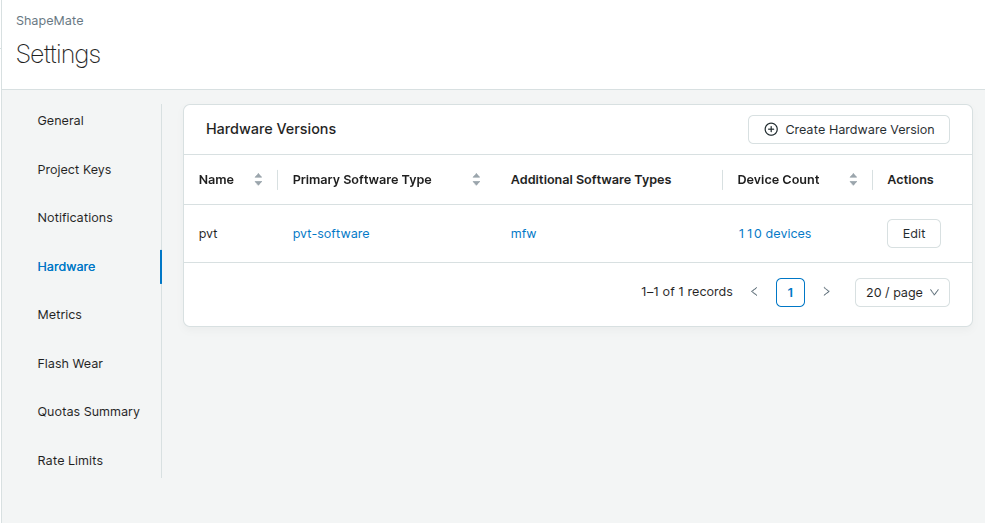
Figure 1: Hardware Version settings showing the associated Software Types, including a non-primary component.
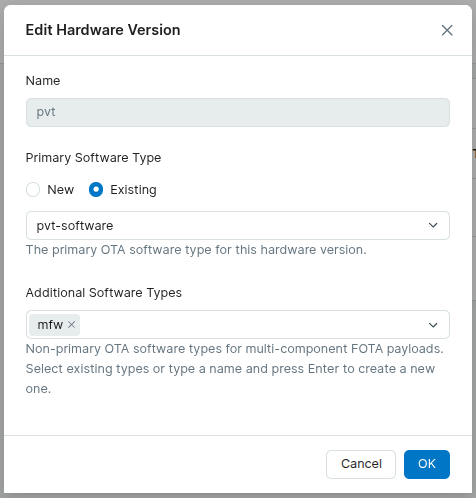
Figure 2: Editing the Software Type associated with a Hardware Version.
Uploading Component Artifacts
When adding an OTA payload to a Release, the Add OTA payload dialog includes a tab for uploading a non-primary component artifact, alongside the primary artifact tab (Figure 3). Select the component's Software Type and provide its "Component version" (and, for a component delta payload, its "Delta base version") to attach the payload to that component. Note that just like Primary releases, the Versions here must exactly match what the device reports when querying for an update.
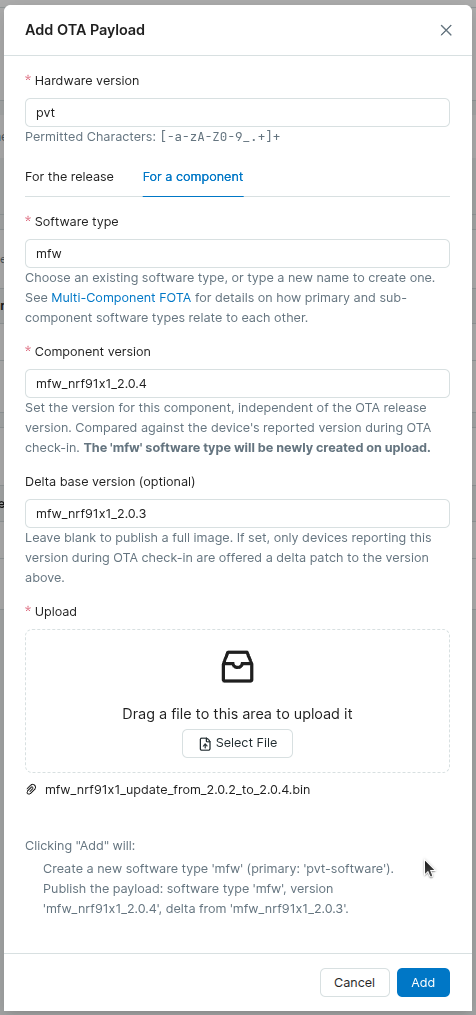
Figure 3: The Add OTA payload dialog, with a tab for uploading a non-primary component artifact.
Release Artifact Table
A Release's artifact table lists every uploaded artifact, showing the Software Version for each component alongside the primary artifact (which is now labeled explicitly, since it's no longer the only artifact in the Release), as shown in Figure 4:
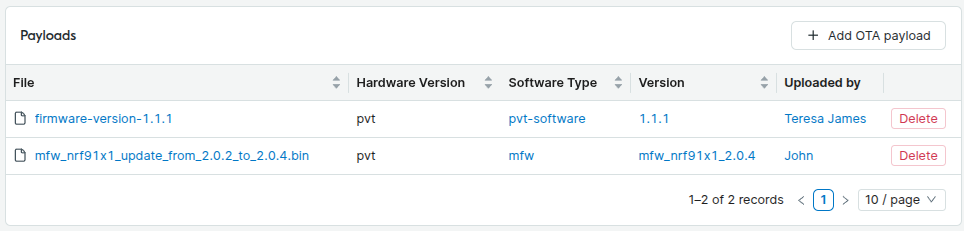
Figure 4: A Release artifact table listing the primary artifact and the non-primary component artifacts with their Software Versions.
Component Delta Updates
Releases, both Full and Delta, are always defined by the Primary Software Type's version. A non-primary component cannot have a Delta Release of its own. Instead, a component delta is uploaded as a payload on a Full Release, with the component's Software Version and its "Delta base version". Component delta payloads can't be attached to a primary Delta Release.
Within a Full Release, payloads are resolved for each component independently. When a device requests an update for a given component (Software Type),
Memfault resolves it using the same precedence as primary OTA resolution, scoped to that component's payloads in the Release:
- a delta payload whose Delta base version matches the component's current version, if one exists
- otherwise, the component's full payload
This means components can be upgraded via delta payloads on their own schedule, without requiring the primary component (or any other component) to also ship a delta.
Because a component request only matches payloads for that Software Type, a payload for one component is never served in place of another. This lets different components be added to, or omitted from, a Release independently, for example a Release can include a delta payload for one component without touching the others.