Memfault Location Services
Memfault Location Services give your devices fast, accurate, low-power location data. Without having to connect to multiple vendors and APIs, you can use our Location Services to get Single Cell or Multi Cell, Wi-Fi, or combine Wi-Fi and Cell into a Groundfix.
You can now discover, configure, and start using Location Services directly from Memfault, without leaving the platform to manage tokens or read separate docs.
Contact your Customer Service Representative or send us an email.
What you get
Memfault supports four services types, single and multi-cell, Wi-Fi, and Groundfix which determines the most accurate fix between Wi-Fi and cell, all in one API.
| Service | Typical accuracy | Power savings | GNSS required | Use when |
|---|---|---|---|---|
| Single-cell (SCELL) | Less than 1000 m | High | No | The device is power-constrained or indoor, and coarse location is acceptable. |
| Multicell (MCELL) | Less than 700 m | High | No | Several cells are usually in range and tighter cellular accuracy is needed. |
| Wi-Fi | Less than 100 m | High | No | The device operates indoors with Wi-Fi access points in range. |
| Groundfix | Less than 700 m | High | No | When you want the best fix determined from cell and Wi-Fi access points in range. |
Accuracy values are typical reference figures and not guaranteed. Reported
uncertainty is the horizontal positioning error — the radius around the
returned coordinates within which the device sits with roughly 68% probability.
Setting up Location Services via API
You can set up location services directly from your cloud via API.
- Authenticate with an organization auth token (OAT) scoped to Location Services.
- All requests go through the REST API.
Get started
Step 1: Enable Location Services in your account
Reach out to your Customer Success Manager or Account Executive and we'll enable Location Services in your account so you can get started trying up to 1500 requests per month for free.
Step 2: Find your organization and project slugs
You need both slugs to construct Location Services API URLs.
- In the left sidebar, click Project Settings → General.
- Copy the Organization Slug and Project Slug values from the Details panel.
Step 3: Run the Location Services setup guide
Memfault includes a guided wizard that explains your options and gets you to a working request in a few minutes.
- Select Location Services from the project sidebar.
- Step through the education and setup flow:
-
Service Types. Expand the SCELL, MCELL, and Wi-Fi cards to compare accuracy, power, and prerequisites.
- Access Methods and OAT Setup. Choose if you plan to send requests from your own cloud via API or connect devices in-platform.
- Plan and Pricing. Review billing details and confirm the plan.
-
- The app marks the wizard complete on the server, so it persists across browsers and reloads.
Click Skip for now on any step to jump straight to the Location Services overview page.
Step 4: Generate an organization auth token (cloud-to-cloud)
You need to generate an Organization Auth Token (OAT). You do not need to leave the Location Services page to do this.
- On the Location Services overview page, find the Send API Requests section.
- Click Generate token.
- Enter a description (for example,
Location Services) and click Create. - Copy the token immediately and store it in a secrets manager. The token is shown only once.
- (Optional) Click Manage tokens to view existing tokens or revoke one.
Only organization admins can create OATs. If you are not an admin, the page shows a notice — ask your admin to complete this step. Tokens grant the same permissions as an organization admin via the API. Treat them like passwords: do not commit them to source control or share them in chat.
Once the organization has at least one token, the Generate token button is hidden. Use Manage tokens to add more if you need to rotate.
You can also create OATs directly from Admin → Organization Auth Tokens → Create Token if you prefer the settings route.
Step 5: Make your first request
The base URL for Location Services endpoints is:
https://api.nrfcloud.com/v1/organizations/<YOUR_ORG>/projects/<YOUR_PROJECT>/location
Replace <YOUR_ORG> with your Organization Slug and <YOUR_PROJECT> with
your Project Slug from Step 2.
The overview page shows a pre-filled sample cURL request using your actual slugs. You can copy it directly from there, or use the following Wi-Fi example:
curl -v -X POST \
  https://api.nrfcloud.com/v1/organizations/<YOUR_ORG>/projects/<YOUR_PROJECT>/location/wifi \
  -H "Authorization: Bearer $NRFCLOUD_OAT" \
  -H "Content-Type: application/json" \
  -d '{
    "accessPoints": [
      {
        "macAddress": "30:86:2d:c4:29:d0",
        "signalStrength": -45
      },
      {
        "macAddress": "3c:37:86:5d:75:d4",
        "signalStrength": -45
      }
    ]
  }'
A 200 OK response with a JSON body containing lat and lon confirms that
your OAT and slugs are working.
Service costs and plans
Location Services usage is metered per request type. To get started with pricing and to try it out for free, contact your Customer Success Manager.
Memfault stores location history for six months.
Method details
The rest of this page covers each method in depth and shows how it works on the device.
Cellular location (SCELL and MCELL)
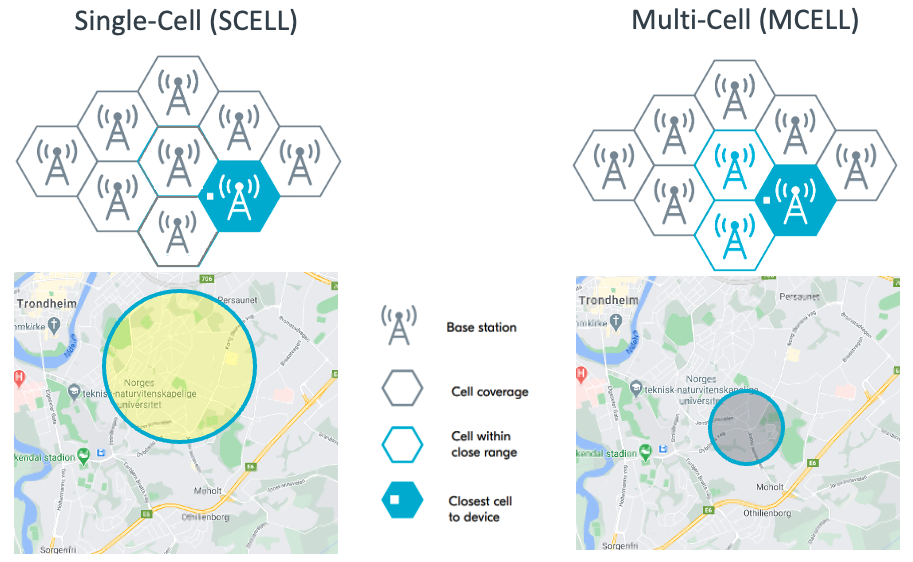
Cell-based location identifies the nearest cell tower, or a triangulated position based on multiple cell towers, based on the cell tower IDs and signal strength. While generally less accurate, its low cost and low bandwidth can give you general positioning for when battery and bandwidth are a concern.
- SCELL. Uses only the serving cell. Lowest accuracy, lowest cost. Good for power-constrained or indoor devices.
- MCELL. Uses the serving cell plus measured neighbor cells (
nmr). More accurate, marginally more bandwidth.
Find cell parameters on the device
You need MCC, MNC, TAC, and ECI to construct a request. Get these with the Cellular Monitor app in nRF Connect for Desktop:
- Open the Cellular Monitor app.
- From the Dashboard, note the values:
MccandMncappear together as the PLMN ID. The first three digits are MCC; the last two or three are MNC.CellIdis the ECI.TACis a five-digit tracking area code.
- For neighbor cells, open the debug log and search for
nmr. Each entry hasearfcnandpci.
Location Services validates MCC and MNC against the ITU-T E.212 ranges. Out-of-range values are rejected at the API. Pull the values straight from the modem rather than hand-coding them.
Call the ground-fix endpoint
The
GetGroundFix
endpoint combines cell and Wi-Fi positioning in one request. It tries Wi-Fi
first, then falls back to cellular.
curl --location --request POST \
  "https://api.nrfcloud.com/v1/organizations/<YOUR_ORG>/projects/<YOUR_PROJECT>/location/ground-fix" \
  --header "Authorization: Bearer $NRFCLOUD_OAT" \
  --header "Content-Type: application/json" \
  --data-raw '{"lte":[{"mcc":'"$MCC"',"mnc":'"$MNC"',"tac":'"$TAC"',"eci":'"$ECI"'}]}'
Include an nmr array of neighbor cells to improve accuracy. The response
includes lat, lon, uncertainty, and fulfilledWith.
Results are written to the location history which you can access for up to six
months through the
GetLocationHistory.
Wi-Fi location
The device scans for nearby Wi-Fi access points, sends their MAC addresses to
Memfault, and receives coordinates derived from our dataset. Wi-Fi is often more accurate than cellular for indoor devices.
There are two types of mac addresses: locally administered and globally administered (see MAC address: Universal vs. local for more information). Memfault accepts both types.
Filter out mobile hotspots client side, these hotspots return unreliable positions because the access point itself moves.
At least two Wi-Fi access points are required for both the /wifi and
/ground-fix endpoints for privacy reasons. A single access point combined with
cell data is also accepted on /ground-fix.
To locate a device from a single Wi-Fi access point, set fallback=singleWifi
on a /ground-fix request. Single access point estimates are less accurate, so
this setting must be requested explicitly. Use it if a coarse location is
preferable to no location for your application. See the
Ground Fix best practices
and the
fallback query parameter
for details.
Reverse geocoding
Convert coordinates into a human-readable address with
GetGeocoding.
The response includes at minimum the country and the state, province, or region.
Higher-accuracy input coordinates (Wi-Fi) produce higher-accuracy addresses than coarse cellular fixes.
Location history
Memfault stores every successful position request for six months. Pull the
history with
GetLocationHistory,
or view it on the device page in Memfault.
API requirements
All Location Services REST requests authenticate with an Organization Auth Token
(OAT) passed as a Bearer token in the Authorization header.
For API requests, include your OAT as follows:
Authorization: Bearer $NRFCLOUD_OAT
Troubleshooting
Cell location requests fail
- Open Cellular Monitor and confirm the device has a signal and the correct COM port is selected.
- Wait two or three minutes after boot — connection setup is sometimes slow.
- Verify network coverage with your carrier.
- For iBasis SIMs, check the data balance under Device Management > SIM Cards.
Coordinates do not match the actual device location
The returned coordinates are the center of an uncertainty circle. The device sits somewhere inside that circle with ~68% probability, not necessarily near the center.
Uncertainty values are unusually large
High uncertainty usually means one of:
- Low cell density (rural).
- The ECI is unknown and the service fell back to a tracking-area estimate. Tune behavior with the fallback query parameter.
- The cells or access points in the request are physically spread out — for example, after a cell ID reassignment.
MCELL produces the same result as SCELL
Two reasons:
- The neighbor cell overlaps so much with the serving cell that it does not move the estimate.
- The neighbor cell is not yet in the Memfault database, so only the serving cell was used.
MCELL is still worth sending: it raises the odds of a valid result when the serving cell alone is unknown.
Why do the API docs link to nRF Cloud APIs?
Memfault was acquired by Nordic Semiconductor in July 2025 and is in the process of integrating with nRF Cloud, which was Nordic Semiconductor's cloud offering. The Location Service APIs are powered by nRF Cloud.
Next steps
- Open the Location Services wizard in Memfault to set up your organization.
- Contact your Customer Success Manager to get started with setup and pricing.
- Migrating from Unwired Labs? Read our API Migration guide to get started.