nRF Cloud Location Services
nRF Cloud Location Services lets you obtain location data for your devices. Location data is critical for many types of devices and use cases, for example, asset tracking, wearables, smart appliances, and point-of-sale payment terminals. nRF Cloud Location Services offers faster location fixes, improved location accuracy, and greater power savings.
You can obtain location data through the CoAP API, MQTT API or REST API. There are also samples and applications that integrate with nRF Cloud to show location data in the terminal or nRF Cloud portal.
nRF Cloud stores location data for six months.
Types
nRF Cloud supports the following types of location services, two using the device's GNSS receiver, two using cells, and one using Wi-Fi:
| Service | Speed | Accuracy (typical) | Power savings | GNSS requirement | Description |
|---|---|---|---|---|---|
| Assisted GNSS (A-GNSS) | Faster | < 10 m | Low | Yes | Provides assistance data to the device. Enables a faster time-to-first-fix (TTFF) for the GNSS receiver. Gets satellite data over the cellular connection and uses the GNSS receiver to obtain a fix. Includes an SCELL request as part of acquiring a fix. |
| Predicted GNSS (P-GNSS) | Faster | < 10 m | Medium | Yes | Provides multiple days of predicted satellite data to the device. Enables a faster time-to-first-fix (TTFF) for the GNSS receiver. Reduces frequency of new assistance data requests. |
| Single-cell location (CELL_POS: SCELL) | Fastest | < 1000 m | High | No | Gets the coarse location of the device based on the nearest cell. Single-cell positioning, or SCELL. Saves power by eliminating the need for the GNSS receiver. Part of ground fix operation. |
| Multicell location (CELL_POS: MCELL) | Fastest | < 700 m | High | No | Gets the coarse location of the device based on the nearest cell and its neighbor cells. Saves power by eliminating the need for the GNSS receiver. Part of ground fix operation. |
| Wi-Fi | Faster | < 100 m | High | No | Calculates location in relation to at least two nearby Wi-Fi network access points (APs). Saves power by eliminating the need for the GNSS receiver. Part of ground fix operation. |
Accuracy values are for reference only and not guaranteed.
Speed
Speed refers to how quickly the device can obtain its location. The given values refer to the relative performance of each method compared to unassisted GNSS. All methods provide speeds that are orders of magnitude faster than unassisted GNSS, which can take minutes to obtain a fix, depending on the time-to-first-fix (TTFF).
How fast the device can obtain a fix depends on the degree to which the device can inform its GNSS receiver of its location. This gives the receiver a narrower piece of sky to find satellites. Assisted GNSS is faster than unassisted GNSS because the receiver already has satellite location data.
Accuracy
Accuracy is the likely maximum distance in meters that a position response differs from the device's actual geographic position. This can vary for a number of environmental and geographic conditions. The values indicated in the table are for reference only and not guaranteed.
The actual accuracy is different from the uncertainty value provided in LTE
and Wi-Fi responses. Uncertainty is the estimated Horizontal Positioning Error
(HPE). This is the radius of an area around the returned coordinates in meters,
of which there is a 1-sigma (~68%) probability that the device's actual position
falls within this area.
In the case of LTE positioning, these estimates depend on whether the device can find multiple cells (MCELL). In rural areas, the device might only find one or two cells covering a 10+ km radius. Cell-based location assistance should not be measured against the accuracy of smart phones that can use Wi-Fi location assistance or GNSS receivers and processors.
Choosing a service
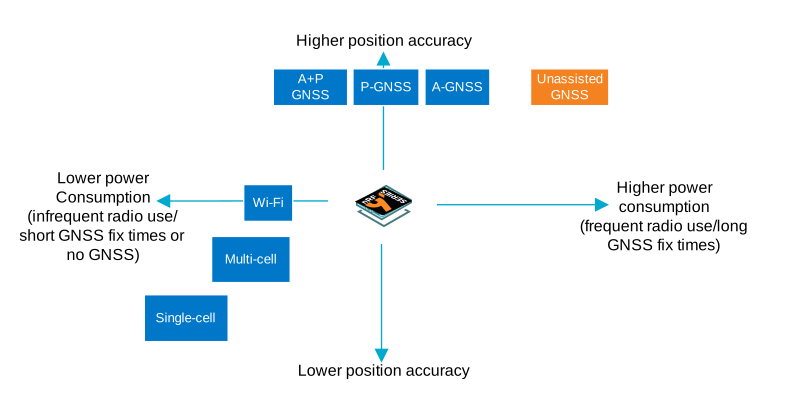
Choose services according to your accuracy, power consumption, and device memory requirements.
See an overview of Location Services features for more information.
Service costs
Location Services usage is priced according to your plan.
Next steps
- Explore the Multi-service sample and Location Services libraries for the nRF Connect SDK.
- See the Introduction to Location Services guides.
- If you want to use Location Services in a cloud-to-cloud (C2C) setup, check the requirements.