Cell location service cloud-to-cloud integration
The Cell Location service enables you to acquire an approximate device location based on the cell it is currently connected to and those that it can communicate with. Information about the cells can be converted into a geolocation that, for example, can be shown on a map.
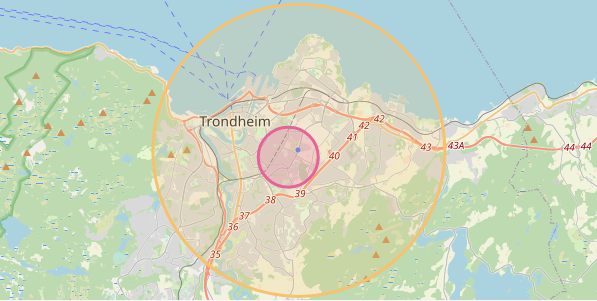
The screenshot shows three locations for a device:
- Its latest known GNSS location (a blue dot).
- Approximate location based on the cell it is currently connected to (yellow circle).
- Approximate location based on the cell it is currently connected to and the neighboring cells it can receive a signal from (red circle).
This guide walks you through the components and processes you need for integrating nRF Cloud Location Services into your own cloud solution. You can use the location information in an application, for example to visualize or to track the devices.
Sending cell data from the device to the cloud
The firmware running on the nRF9160 needs to acquire information about the mobile network it is connected to, and send this cell location data to nRF Cloud.
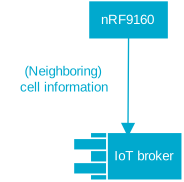
Sending information about the current connected cell to your backend
On the device, you can use the Modem information library to acquire information about the network the device is currently connected to. This information can be used on the backend to resolve the device location. The digital twin (on AWS called device shadow) is a good place to store this information. An example could look like this:
{
  "nw": "LTE-M GPS",
  "eci": 33703712, // Enhanced Cell ID
  "plmn": 24202, // Public Land Mobile Network ID. (MCC + MNC)
  "tac": 2305 // Tracking Area Code
}
The
Modem information
library uses the
+CEREG
AT command that has an internal cache and can get outdated once the device
enters power saving mode (PSM). If the device is moved, this information becomes
outdated until the modem wakes up again and communicates with the network.
To get up-to-date information about the current cell (and additional information
about neighboring cells, which improves the accuracy of your location estimate),
use the
%NCELLMEAS
AT command. This would, however, cause slightly higher energy costs.
Sending information about the current connected cell and neighboring cells to your backend
The
%NCELLMEAS
AT command scans for neighboring cells and returns the current connected cell
and zero or more neighboring cells the device can communicate with.
The Link Controller library has a method
int lte_lc_neighbor_cell_measurement(void)
that implements the handling of the AT command. Refer to the
Asset Tracker v2
for a reference implementation.
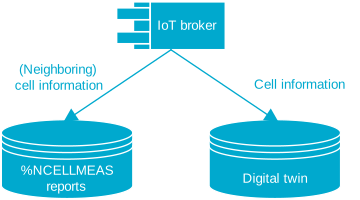
This information can be used on the backend to resolve the device location. If neighboring cells are found, the approximate location will be more precise. Because the size of the report can be quite large, it is not feasible to store it in the device shadow. Therefore, it is recommended to send it as a separate message on a custom MQTT topic. An example could look like this:
{
  "adv": 65535,
  "earfcn": 6300,
  "eci": 34288908,
  "plmn": 242002,
  "rsrq": 8,
  "rsrp": 24,
  "tac": 2310,
  "nmr": [
    {
      "rsrp": 22,
      "eci": 291,
      "rsrq": 6,
      "earfcn": 6300
    },
    {
      "rsrp": 21,
      "eci": 129,
      "rsrq": 4,
      "earfcn": 6300
    }
  ]
}
Storing cell location data on the cloud
The cell data sent from devices needs to be stored into the IoT digital twin service or a database. This allows to provide this information to applications at a later time and to asynchronously resolve cell information to geolocation using the nRF Cloud Cell Location service REST API. If the processing of the data fails, it can be retried.
For single cell location, this store can serve as a cache. The location information for a cell can be reused if many devices are connected to the same cell. Their approximate geolocation is the same.
Resolving cell location data
Resolve the cell location data into geolocations using the
GetLocationFromCellsOrWifiNetworks
API method.
Authenticating Location Services requests
Authenticate all API calls using an
Organization Auth Token (OAT).
Include the token in the Authorization: Bearer header. Store the OAT securely
in your cloud backend.
For setup instructions, see the Location Services Quickstart.
Implementing a cell location resolver
You need to implement a resolver that queries the
GetLocationFromCellsOrWifiNetworks
API method with the stored single cell or neighboring cell data. It uses the OAT
to authenticate the request and stores the results in a database. You can
retrieve the results later and use them to provide a historic location trace for
a device.
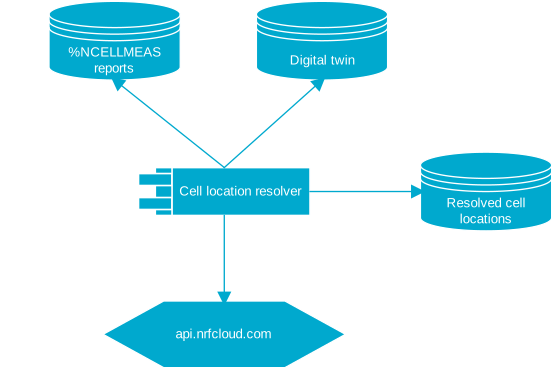
Location data looks like this:
{
  "lat": 45.524098,
  "lon": -122.688408,
  "uncertainty": 300,
  "fulfilledWith": "MCELL"
}
Merging similar cell requests
An example scenario for this step is hundreds or thousands of devices that are unloaded from a steel-walled cargo container. All of them connect to the cellular network and to the same cell, and start sending their cell location data to the cloud at the same time.
When you want to show all of these devices on the map, you only need to resolve the cell once, and not overwhelm the nRF Cloud server with thousands of requests. Therefore, the cell location resolver needs a caching mechanism that detects requests for the same cell location and does not re-request this data.
Visualizing approximate device location
Now, all data is present to visualize the approximate device location on a map.
Querying location data
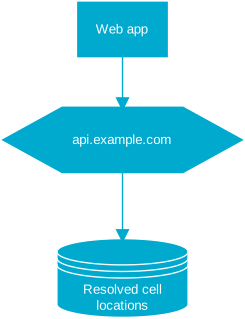
You can now expose device cell location results to a web application, for example through a REST API.
Drawing the circle on map
You now have the latitude and longitude of the geolocation and can draw a circle around this location, with the radius in meters given by the accuracy.
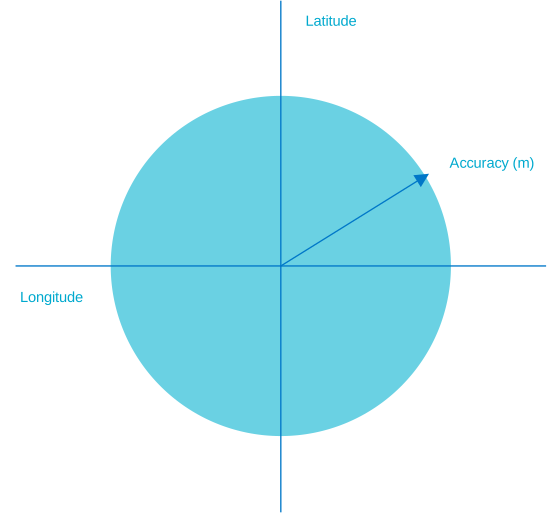
The circle represents the area where the device is located with a 68% certainty.
Full diagram
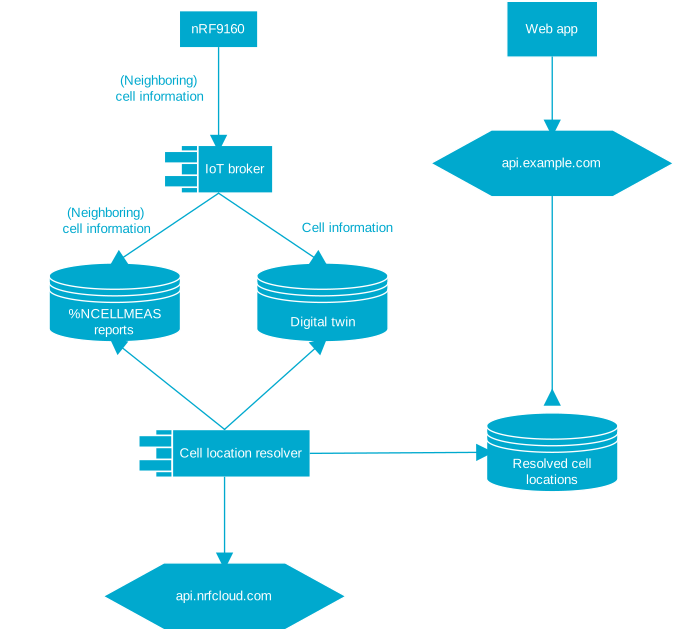
The following full diagram shows the flow of device cell location data and the necessary components involved to resolve this data into a geolocation and make it available to a web application.