Device shadow
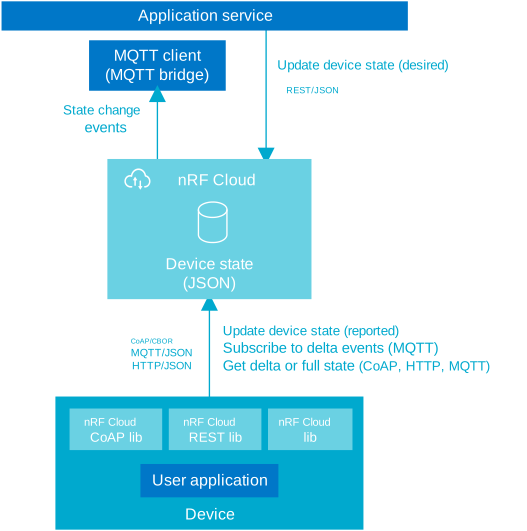
A device shadow or digital twin refers to a JSON document in nRF Cloud that contains the state of the device. It enables you to set the desired state, see the device's reported state, and add metadata for the device.
See more about device shadows in the AWS documentation.
You can edit one device shadow at a time.
Configuring a device
It is recommended to interact with devices through their shadows instead of
sending them messages directly. MQTT devices can subscribe to the
/shadow/update/delta topics and CoAP/HTTP
devices can request the delta. A device can also be programmed to
retrieve its shadow when it comes back online. This
removes any concerns about a device being offline when you want to change its
state.
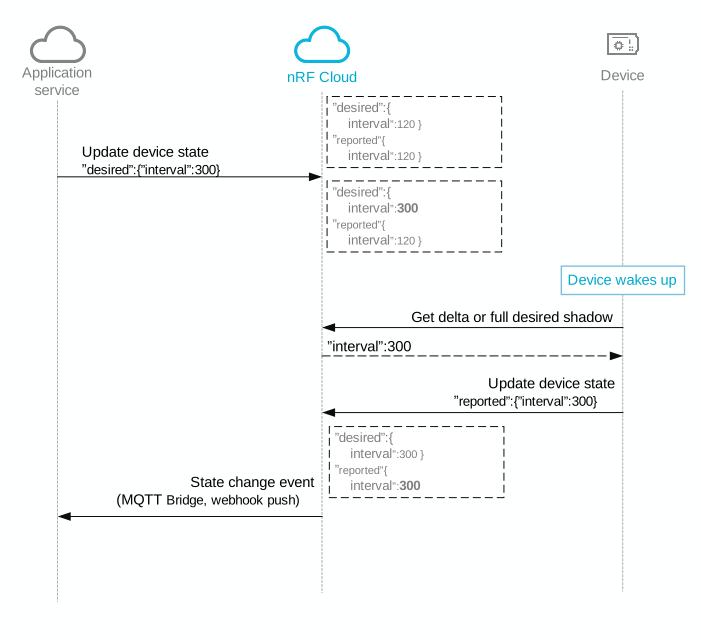
You might, for example, want to change your device's configuration to send temperature sensor readings more frequently. Instead of publishing a message directly to the device, you can update the device's configuration in the shadow. The device sees the change, updates its message frequency, and reports back to nRF Cloud.
Shadow schemas
nRF Cloud defines a shadow schema for nRF Cloud services and device interaction. A device's shadow must follow the definitions of the fields defined in the schema.
All fields marked as required in the schema must always be present. The schema
does not restrict additions to the "reported" and "desired" sections. You
can add your own fields there, to define your own models for application
communication.
You can find device shadow schema definitions in the JSON schema.
Nordic devices have a TLS buffer limit of 2 KB in the modem, but the complete shadow of a device can exceed that size. See Shadow topics for details.
Managing the device shadow in the nRF Cloud portal
The following operations are available in the nRF Cloud portal:
- Viewing the full device shadow.
- Viewing the device config in the nRF Cloud portal: Requires the
configfield in the device shadow. - Editing the device shadow: Once you add this field to the device shadow, you
can
change the
configsection.
Getting a device shadow
This section explains how to get data from the device shadow using the APIs.
- Through CoAP
- Through the REST API
- Through the MQTT API
The nRF Connect SDK provides integrated libraries for shadow interactions. See the nRF Cloud CoAP library on how to get and update a shadow for a CoAP-connected device.
You can retrieve a device shadow by calling the REST API
FetchDevice or
ListDevices endpoints.
If using ListDevices, set the includeState parameter to true.
Alternatively, the nRF Connect SDK provides integrated libraries for shadow interactions. See the nRF Cloud REST library on how to get and update a shadow for a device using the REST API.
A device can retrieve its own shadow by publishing any message to the
/shadow/get/trim topic. See the MQTT API for
more information.
Updating a device shadow
This section explains how to update the device shadow.
- Through the REST API
- Through the MQTT API
You can update a device shadow through the
UpdateDeviceState
endpoint:
curl -X PATCH https://api.nrfcloud.com/v1/devices/[device-id]/state \
-H "Authorization: Bearer [API-Key]" \
-H "Content-Type: application/json" \
-d '{ "desired": { "msg":"[message content]" }}'
Devices can update their own shadows by publishing to the /shadow/update
topic. See more about shadow topics in the
MQTT API documentation.
Examples: enabling FOTA
If you want to enable the nRF Cloud firmware over-the-air (FOTA) update service, you must configure your device for FOTA. This depends on your device type and protocol.
- devices
- Through the REST API
- Through the MQTT API
For a device to be able to use FOTA, the device must contain a
reported.device.serviceInfo.fota_v2 array in its shadow, for example:
  ...
  "reported": {
      "device": {
        "serviceInfo": {
          "fota_v2": [
            "APP",
            "MODEM",
            "BOOT"
          ]
        }
      }
    }
See the REST preparations section of the FOTA documentation for REST API instructions.
To enable FOTA over MQTT, send the following message to the /shadow/update
topic (include the state field):
{
  "state": {
    "reported": {
      "device": {
        "serviceInfo": {
          "fota_v2": ["APP", "MODEM", "BOOT"]
        }
      }
    }
  }
}