Collecting data
A device can send application data to nRF Cloud, which stores the data for 30 days. Devices can use MQTT, HTTP or CoAP interfaces.
To get the data into your own web service, see the Message Routing Service.
You can fetch the messages from the message history using the
ListMessages endpoint.
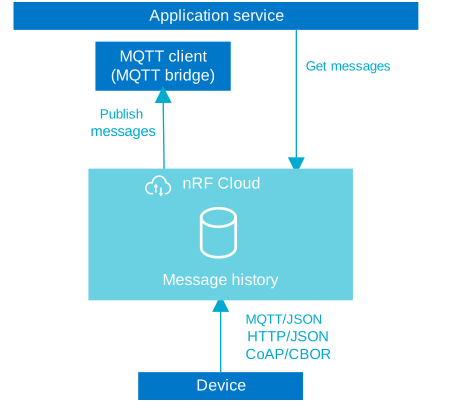
Device messages retrieved through the APIs are not filtered according to a user's group access or role. This means a user can view messages for devices they do not otherwise have access to.
If you want to keep device messages more secure within your teams, set up a new team for those devices and invite only those team members you want to give message access to.
For legacy alerts migration details, see
Migrate nRF Cloud Alerts to Memfault Trace Events.
Message schemas
You can send device messages using any schema. However, if you want full support of nRF Cloud for parsing and viewing messages on the nRF Cloud portal, your device messages should conform to nRF Cloud's published schemas. See the nRF Cloud application-protocols project for more information.
Message timestamps
nRF Cloud stores device messages with some metadata, including a ReceivedAt
timestamp. This is the timestamp used by the data range that you must set when
calling the
ListMessages endpoint.
ReceivedAt is a Unix timestamp in milliseconds according to the
Unix epoch. You can use the
EpochConverter if you need to verify some
timestamps in a human readable format.
The value of ReceivedAt is set in one of two ways:
- To the same value as the device message's
tsfield, if present. Values set in thetsfield undergo basic validation. If the value is not a Unix timestamp, or if the value is older than 90 days, nRF Cloud does not use it. - Otherwise, it is set to the current timestamp, the Unix time in milliseconds when the message was received by nRF Cloud.
When storing device messages, nRF Cloud does not alter the message payload. For
example, if you send ts: 0 in your device message, it is stored with that
value, but ReceivedAt shows the current timestamp because nRF Cloud does not
consider it valid.
The benefit of setting a ts in your device messages is that the timestamp
shows when the messages were recorded on the device, not when nRF Cloud received
them. This can be beneficial for certain real-world scenarios, such as an
ultra-low power scenario where devices stay offline for extended periods then
send a batch of messages.
Sending device messages
You can send device messages using either the nRF Cloud MQTT, REST, or CoAP APIs. See the nRF Cloud APIs overview for more information.
Data loss can occur if you send more than 3000 messages in a second from a team. For example, when you send messages across all your devices.
Single or bulk messages
Devices typically send messages one at a time. However, nRF Cloud also supports
bulk message sending over MQTT and CoAP, which is useful for low-power,
low-connectivity or constrained device scenarios. For details, see the
/d2c/bulk topic in the MQTT API and the
CoAP API.
Messages bundled under the bulk topic are still counted individually toward your service limits.
MQTT API
For storage in nRF Cloud, devices should send messages over the MQTT messaging topics.
CoAP API
To store messages in nRF Cloud using CoAP, devices should send messages following the nRF Cloud CoAP API documentation.
REST API
You or your devices can call the
SendDeviceMessage
endpoint to send a message on behalf of the device specified by the deviceId.
Compare this with the specified device sending the message itself, directly over
MQTT. This allows for one-way MQTT messaging through a REST proxy, which is
useful for devices that are not running an MQTT client.
Additionally, if the message is sent to a topic that another device is subscribed to, you can send a message directly to that device, as long as both devices are currently connected to the nRF Cloud platform.
The topic you provide is appended to the main device message topic prefix (see the nRF Cloud MQTT API).
For example, if you set the topic to warehouse1/temperature, the message is
published to {mqttTopicPrefix}/m/warehouse1/temperature.
Retrieving device messages
You can retrieve your device messages using either the REST APIs or the Message Routing Service.
REST API
You can retrieve device messages through the
ListMessages endpoint.
If data messages are not shown in the ListMessages response, and you know they
were sent by your device(s), make sure you are sending a proper Unix timestamp
in your device message's ts field, or do not use that field at all. For more
information, see Message timestamps.
Message Routing Service
You can set up a web service to receive device messages sent to nRF Cloud through the Message Routing Service.
Sending commands to a device
nRF Cloud uses the device shadow as a mailbox to deliver commands to devices connected through different protocols. To send a command to a device, you can update the desired state of the device's shadow. For an MQTT connected device that is subscribed to the shadow delta, the device gets the command as a published event. For HTTP and CoAP, the device needs to connect and request the shadow delta.
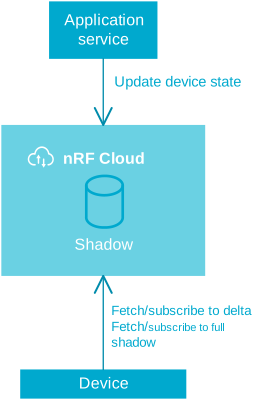
See Device shadow for instructions on how to update the shadow.