nRF Cloud CoAP API
This page provides an overview of the nRF Cloud CoAP API.
Currently, CoAP connectivity is enabled only through the nRF Cloud CoAP library. Custom clients using direct CoAP API requests are not supported.
Constrained Application Protocol (CoAP) is a specialized protocol designed for communication between devices with constrained resources. CoAP enables devices to communicate over constrained networks with minimal data traffic usage.
CoAP sends fewer and smaller messages using CBOR message formatting instead of JSON, thus reducing network traffic.
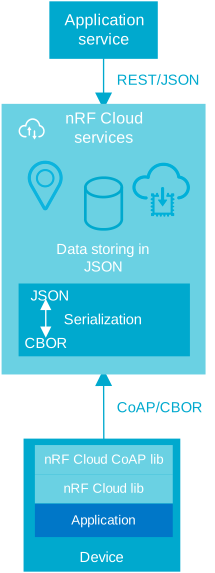
CoAP enables the device to sleep and communicate with the cloud only when needed, saving power. By using DTLS with a connection ID (CID) instead of repeating the handshake, a constrained device using CoAP can more efficiently re-establish a connection upon waking. The reduced network load, in turn, saves power by reducing modem usage. The protocol allows you to send information to the device asynchronously by updating the device shadow using the REST API.
CoAP uses a client-server model based on the REST architectural style. It provides a set of methods similar to those in HTTP, such as GET, POST, PUT, and DELETE, allowing devices to interact with resources in the cloud.
CoAP uses UDP as its underlying transport protocol instead of TCP, which reduces the overhead and complexity associated with TCP's reliability mechanisms. CoAP also includes its own reliability features based on retransmissions.
nRF Cloud CoAP services and features
nRF Cloud supports the following services through CoAP:
-
Location Services:
- Assisted GNSS (A-GNSS)
- Predicted GNSS (P-GNSS)
- Ground fix
-
FOTA:
- Fetch current pending FOTA job execution and download FOTA image.
- Update FOTA job execution status
-
Messaging:
- Publish messages
- Fetch device state
- Update device state
- Fetch device state delta
Device requirements
To use the nRF Cloud CoAP API, your setup must meet the following requirements:
- nRF91x1 or nRF9160 device.
- Modem firmware:
- For nRF9151: Modem firmware v2.0.0 or later.
- For nRF9160: Modem firmware v1.3.5 or later.
Samples and libraries
The following samples and libraries support CoAP:
- Asset Tracker template application, it provides an event-driven architecture for battery-powered IoT use cases with cloud connectivity, location tracking, and sensor data collection.
- nRF Cloud CoAP Device message sample.
- nRF Cloud CoAP FOTA and Observability
- nRF Cloud CoAP cellular location sample.
- nRF Cloud CoAP library. See the library for more information on specific endpoints, operations, and configurations.
For more general information on CoAP, see the Zephyr overview.
Message formatting
Concise Binary Object Representation (CBOR) is a compact binary data serialization format designed to efficiently represent data structures. It is similar in purpose to JSON but provides a more concise binary representation.
Every CoAP endpoint supports CBOR to optimize data traffic by minimizing or compressing data payloads. The protocol also supports JSON. Using CoAP with CBOR can reduce data usage by up to 75%.
Example:
Calling POST /v1/location/ground-fix over HTTP with JSON can use approximately
1.2 kB of data. The same message over CoAP with CBOR is approximately 0.3 kB.
These calculations include TLS over HTTP and DTLS over CoAP headers, assuming
that a secure connection is established and no handshake is done.
CBOR serialization
You can optimize the CBOR serialization with a defined schema. nRF Cloud uses Common Data Definition Language RFC8610 (CDDL) for this purpose. The following table describes the CDDL support for the features.
| Feature | Request | Response |
|---|---|---|
| FOTA | ||
| Fetch pending job | Auto | Auto |
| Update status | Auto | Auto |
| Messaging | ||
| Fetch device state | Not supported | Not supported |
| Fetch device state delta | Not supported | Not supported |
| Update device state | Not supported | Not supported |
| Publish message | CDDL * | N/A |
| Location | ||
| Assisted GNSS | CDDL | Binary by source |
| Predicted GNSS | CDDL | Binary by source |
| Ground fix | CDDL | CDDL |
| Secure provisioning | ||
| Get commands | N/A | CDDL |
| Report results | CDDL | N/A |
- Auto: A CDDL schema cannot be defined as the data format is not known or there is no compression benefit. Binary conversion is done and body is CBOR format.
- Not supported: No CBOR support. Body is in JSON format.
- CDDL: The schema is defined and serialization from JSON to CBOR is done in an optimal manner.
- N/A: The request or response does not have a message body. The CDDL schema is not applicable.
- Binary by source: The data comes from the service in binary format and is not serialized by a CoAP protocol component.
* For application-protocol messages.
Supported transport features
CoAP supports the following transport features:
- IPv4 or IPv6.
- Blockwise transfer: Larger messages are split so they fit into the maximum transmission unit (MTU) limit. These messages fit into smaller UDP frames and are suitable for constrained networks.
- DTLS with connection ID (CID), which allows for a long-lived secure connection and eliminates the need to repeat the DTLS handshake.
Authentication
All CoAP communication with nRF Cloud must use DTLS on port 5684 for server-side authentication.
The server must present its X509 certificate, but the device does not. The device must verify the server certificate. After a secure connection is established, the device sends its JWT to authenticate itself. Once authenticated, the device and server are open for further communication.
Since the device uses a JWT for authentication, it must be onboarded to nRF Cloud.
JWTs
nRF Cloud CoAP supports two types of JWT:
- REST API JWT: This is the same type of JWT used to authenticate REST API requests. Requires onboarding to nRF Cloud.
- Identity JWT: The identity JWT is signed with an identity key that resides on the device. This token is generated through the nRF Cloud Identity Service. Requires onboarding to nRF Cloud.
Secure connection
nRF Cloud supports DTLS 1.2 with CID extension (RFC 9146), which reduces the need to handshake with the server. The server uses a connection identifier to identify the device's secure connection, instead of an IP address, which can change often. This enables the device to use long-lasting, secure connections, even when connecting from behind NAT or after a long period of inactivity.
Example:
In this example, a device sends 100 bytes of sensor data. Every five minutes of activity results in a traffic decrease of 89% over DTLS 1.2 without a CID extension. The time spent online by the device is also reduced.
| Characteristics | DTLS 1.2 | DTLS 1.2 with CID |
|---|---|---|
| Number of handshakes | 288 | 1 or 0 |
| Data transferred | ~606 kB | ~62 kB |
See next
- Using the nRF Cloud CoAP API.