Modem Firmware Update (FOTA)
Nordic Semiconductor's cellular SoCs contain two independently-updateable firmware components:
| Component | Updated via | Reported Software Type |
|---|---|---|
| Application firmware | MCUboot swap | Your application's, e.g. app |
| Modem firmware | nRF modem bootloader | mfw (configurable) |
There are two ways to host modem firmware updates in Memfault:
| Strategy | Modem firmware is hosted in | Memfault SDK |
|---|---|---|
| Single Project (Recommended) | The device's main project, as a Multi-Component OTA component | ≥ 1.47.0 |
| Dual Project | A separate, dedicated modem firmware project | ≥ 1.39.0 |
Use Single Project for new integrations. The application and modem firmware share one project, one set of Releases, and one Cohort configuration, and the device's modem version is tracked alongside its application version. The Dual Project strategy will continue to be supported for existing integrations that already use a dedicated modem project.
Both strategies use the same device-side FOTA flow. The sections below covering integrating into your FOTA loop, delta vs. full updates, and verification apply to both.
Working app FOTA setup: see nRF91 Quickstart.
Versioning
Modem firmware versions follow the format mfw_nrf91x1_<version> on
nRF9151/nRF9161, or mfw_nrf9160_<version> on nRF9160, where <version> is the
version number of the modem firmware. The examples on this page use nRF91x1
versions. The version string must exactly match the value reported by the
modem, i.e. from AT+CGMR.
Modem Firmware Packages
Modem firmware packages for the supported nRF91-series devices can be downloaded from Nordic Semiconductor:
Packages contain both full and delta images, denoted by filename in the ZIP file.
A delta image is named to indicate the source and target versions. For example,
mfw_nrf91x1_update_from_2.0.3_to_2.0.4.bin will update from
mfw_nrf91x1_2.0.3 to mfw_nrf91x1_2.0.4.
A full image will be named like mfw_nrf91x1_2.0.4.cbor (referred to as
firmware.update.image.cbor in the following instructions).
Full vs. delta updates
Delta packages are smaller and faster to download, but each one only updates between two specific versions, so devices that fall behind (or that skip a release) may need several delta updates applied in sequence to reach the latest version. Full modem firmware packages (~2.1 MB) can update a device from any version in one step, at the cost of a larger download and requiring external flash storage on the device to stage the image.
Use full updates only when necessary. Delta updates are the preferred update type.
To support full modem updates, add the following to your prj.conf:
# Enable full modem update support, in addition to CONFIG_MEMFAULT_FOTA_MODEM_UPDATE
CONFIG_MEMFAULT_FOTA_FULL_MODEM_UPDATE=y

# Required by CONFIG_MEMFAULT_FOTA_FULL_MODEM_UPDATE
CONFIG_NRF_CLOUD_FOTA_FULL_MODEM_UPDATE=y
CONFIG_MEMFAULT_FOTA_FULL_MODEM_UPDATE is only available on nRF91-series
devices, and requires CONFIG_MEMFAULT_FOTA_MODEM_UPDATE=y and
CONFIG_LTE_LINK_CONTROL=y to also be enabled.
CONFIG_NRF_CLOUD_FOTA_FULL_MODEM_UPDATE requires external flash of at least
4MB, configured as the FMFU storage partition in your board's devicetree. See
Nordic's full modem firmware update documentation
for details on setting up the storage partition.
software_type string once and use it consistentlymfw is the recommended convention and matches the SDK default. The value you
upload must match CONFIG_MEMFAULT_FOTA_MODEM_SOFTWARE_TYPE on the device
(which defaults to "mfw").
Integrate into Your FOTA Loop
This step is the same for both strategies. Choose the integration path that fits your application.
Option A: Automatic (via existing periodic FOTA check)
For automatic modem FOTA, set CONFIG_MEMFAULT_PERIODIC_FOTA_CHECK=y. On each
interval, the periodic upload job calls memfault_zephyr_fota_start(), which
checks for an application update first and, if none is available, checks for a
modem update. See
Periodic FOTA Check.
Option B: Manual
Call the FOTA functions directly at a time of your choosing:
// Check for app update only (Memfault SDK >= 1.45.0):
int rv = memfault_zephyr_fota_app_start();

// Or check for a modem update only:
rv = memfault_zephyr_fota_modem_start();

// Or check for both app and modem updates:
rv = memfault_zephyr_fota_start();
If both an application and a modem update are pending, the application update is installed first (one reboot), and the modem update on the next check (a second reboot).
Single Project (Recommended)
The modem is tracked on the device's project as a non-primary component, with
the mfw Software Type. Modem firmware payloads are attached to the same
Releases as your application firmware.
Step 1: Enable Modem FOTA
Add the following to your prj.conf:
# Enable built-in modem FOTA support (Memfault SDK >= 1.47.0 for Single Project)
CONFIG_MEMFAULT_FOTA_MODEM_UPDATE=y
Leave CONFIG_MEMFAULT_FOTA_MODEM_PROJECT_KEY unset. With no modem project key,
the SDK checks for modem updates in the device's main project, using
CONFIG_MEMFAULT_FOTA_MODEM_SOFTWARE_TYPE (default "mfw") as the Software
Type.
Step 2: Integrate into Your FOTA Loop
Follow Integrate into Your FOTA Loop, above.
Step 3: Upload Modem Firmware as a Component Payload
Modem firmware payloads are attached to a Full Release in the main project
as mfw component payloads. See
Component Delta Updates
for how Memfault chooses which payload to serve.
The mfw Software Type must be associated with the device's Hardware Version as
a non-primary component. Confirm the association under the Project Settings →
Hardware Versions page, see
Software Type, Hardware Version, and Components.
Example: Delta Modem Firmware Update
To deliver mfw_nrf91x1_update_from_2.0.3_to_2.0.4.bin to devices whose
application is the primary component:
-
Create a normal Full Release (not a Delta Release) for the application version, e.g.
1.0.0, or open an existing one that's already active for your devices. Uploading a primaryapppayload is optional. See Updating a Component Without a New Primary Version. -
Click Add OTA payload and select the component tab:
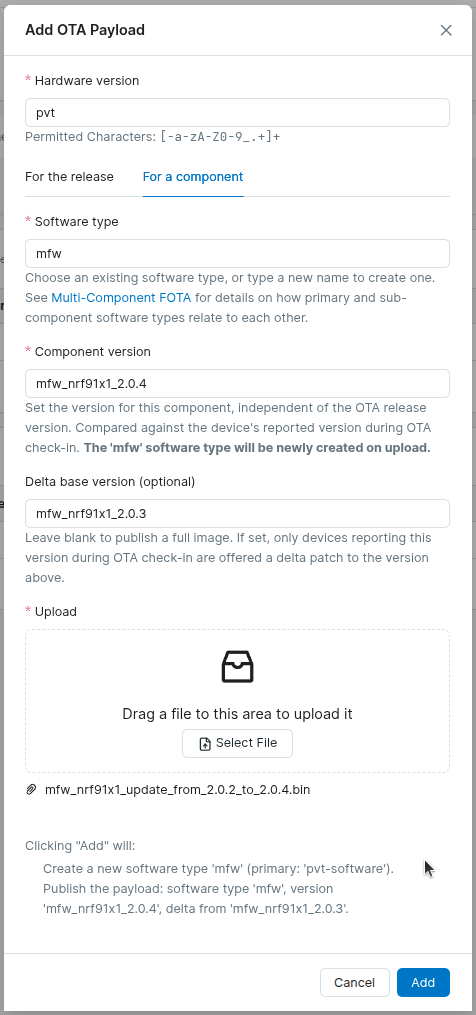
-
Select the
mfwSoftware Type, and set:- Component version: the target modem version,
mfw_nrf91x1_2.0.4 - Delta base version: the source modem version,
mfw_nrf91x1_2.0.3
- Component version: the target modem version,
-
Upload the delta
.binfile as-is. -
Activate the Release for the target Cohort, if it isn't already active.
Devices reporting mfw_nrf91x1_2.0.3 that check for a modem update receive the
delta payload. To cover devices on other modem versions, add more delta payloads
to the same Release (e.g. from mfw_nrf91x1_2.0.2), or a full mfw payload as
a fallback. A full payload requires full modem update support
on the device: leave Delta base version empty, set Component version to
the target version, and upload firmware.update.image.cbor.
Dual Project
The modem firmware is hosted in a separate Memfault project, and the device uses that project's key for modem update checks. Use Single Project for new integrations.
Step 1: Create a Modem Firmware Project
- Log in to app.memfault.com.
- Create a new project (e.g.
my-product-modem). - Copy the Project Key from
Settings → Project Keys. You will need
this in your firmware's
prj.conf.
Step 2: Configure Modem Project Key
Add the following to your prj.conf:
# Enable built-in modem FOTA support (Memfault SDK ≥ 1.39.0)
CONFIG_MEMFAULT_FOTA_MODEM_UPDATE=y

# Project key for the dedicated modem Memfault project
CONFIG_MEMFAULT_FOTA_MODEM_PROJECT_KEY="your-modem-project-key-here"
The optional CONFIG_MEMFAULT_FOTA_MODEM_SOFTWARE_TYPE (default "mfw") can be
set if you used a different --software-type when
uploading.
If you are using nRF Cloud CoAP support (CONFIG_MEMFAULT_USE_NRF_CLOUD_COAP=y)
and are on NCS >v3.4.0, CONFIG_MEMFAULT_FOTA_MODEM_PROJECT_KEY is optional,
and you can instead set the modem Project Key at runtime via the Device Shadow
with the memfaultModemKey field. When set via the following JSON, this value
will override the value of CONFIG_MEMFAULT_FOTA_MODEM_PROJECT_KEY:
{ "desired": { "control": { "memfaultModemKey": "your-modem-project-key" } } }
See the Device Shadow page for more details on configuring the shadow.
Additionally, see the nRF Cloud CoAP FOTA sample in NCS for an example of reading the shadow from the device and reporting the updated state to nRF Cloud.
Step 3: Integrate into Your FOTA Loop
Follow Integrate into Your FOTA Loop, above.
Step 4: Upload Modem Firmware to the Modem Project
Create a new Delta Release (for delta updates) or Release (for full
updates) in your modem firmware project. Match the Hardware Version field to
the hw_version you use when uploading device data to Memfault (e.g.
nrf9151dk), and use the same Software Type as
CONFIG_MEMFAULT_FOTA_MODEM_SOFTWARE_TYPE, see
the note above.
Delta release
Set the From Version and To Version fields to match the source and
target versions in the modem firmware filename, and upload the .bin file as
the release payload.
You'll likely need to create a new Hardware Version in the modem project before uploading the release artifact. Navigate to Settings → Hardware Versions:

Preferably, you can upload the release payload using the
Memfault CLI, using --delta-from and
--delta-to to record the source and target versions and create a delta
release:
memfault --org-token YOUR_ORG_TOKEN \
  --org YOUR_ORG --project YOUR_MODEM_PROJECT \
  upload-ota-payload \
  --hardware-version YOUR_HW_VERSION \
  --software-type mfw \
  --delta-from mfw_nrf91x1_2.0.3 \
  --delta-to mfw_nrf91x1_2.0.4 \
  mfw_nrf91x1_update_from_2.0.3_to_2.0.4.bin
This both creates the new Delta Release, and uploads the payload to the Release.
Full release
Upload firmware.update.image.cbor as a Full Release payload, passing
--software-version with the target version:
memfault --org-token YOUR_ORG_TOKEN \
  --org YOUR_ORG --project YOUR_MODEM_PROJECT \
  upload-ota-payload \
  --hardware-version YOUR_HW_VERSION \
  --software-type mfw \
  --software-version mfw_nrf91x1_2.0.4 \
  firmware.update.image.cbor
Activate the release on the default cohort to begin rolling it out.
Verification/Testing
You can trigger a manual modem-only FOTA from the shell with the
mflt fota_modem command:
uart:~$ mflt fota_modem
[00:01:06.124,755] <inf> mflt: Checking modem FOTA (current version: mfw_nrf91x1_2.0.3)
[00:01:06.524,902] <dbg> mflt: memfault_platform_log: DNS lookup for device-nrf.memfault.com = 44.206.80.55
[00:01:10.440,551] <dbg> mflt: memfault_platform_log: OTA check w/ device info: serial=xxx, hardware=nrf9151dk, software_type=mfw, software_version=mfw_nrf91x1_2.0.3
[00:01:13.656,463] <inf> mflt: FOTA Update Available. Starting Download with URL: https://...
[00:01:13.657,348] <inf> mflt: FOTA In Progress
...
# device will reboot and apply modem firmware update, which takes about 2 minutes to complete
After reboot, confirm the new modem version:
uart:~$ at AT+CGMR
mfw_nrf91x1_2.0.4
OK
If modem firmware is up to date, the logs will indicate it:
uart:~$ mflt fota_modem
[00:07:30.581,787] <inf> mflt: Checking modem FOTA (current version: mfw_nrf91x1_2.0.4)
[00:07:31.053,741] <dbg> mflt: memfault_platform_log: DNS lookup for device-nrf.memfault.com = 54.172.47.91
[00:07:34.266,632] <dbg> mflt: memfault_platform_log: OTA check w/ device info: serial=xxx, hardware=nrf9151dk, software_type=mfw, software_version=mfw_nrf91x1_2.0.4
[00:07:36.568,054] <inf> mflt: Modem firmware is up to date
While possible, downgrading modem firmware via Memfault OTA is not recommended. Nordic does not publish reverse-direction delta packages: downgrades are only possible over-the-air via full modem update.
To revert to a previous modem version for testing, download the previous modem
firmware package, and flash it appropriately. You can use either the nRF Connect
for Desktop app, or nrfutil command line app like so:
# install the "91" nrfutil command if not already installed
❯ nrfutil install 91
# perform the modem downgrade
❯ nrfutil 91 modem-firmware-upgrade --firmware ~/Downloads/mfw_nrf91x1_2.0.3.zip --verify --serial-number 1051243117
Troubleshooting
| Symptom | Likely cause |
|---|---|
modem_info_string_get returns error | LTE not yet attached when the FOTA check runs |
| OTA check returns 0 (no update) but release is activated | Verify software_type and software_version reported by the device match what was uploaded; check the Processing Log |
| Single Project: modem update not offered | Confirm mfw is associated with the device's Hardware Version as a non-primary component, and that the payload is on an active Full Release (not a Delta Release) |
fota_download_any returns -ENOTSUP | CONFIG_DFU_TARGET_MODEM_DELTA not selected (defaults y on nRF91X; check west build -t menuconfig) |
| Download starts but device reports wrong version after reboot | For delta updates: the source version in the filename must match the modem firmware currently installed on the device |