May 2026
Highlights
MCP Server
The new Memfault MCP (Model Context Protocol) server lets MCP-compatible AI assistants like Claude Desktop, Claude Code, Cursor, VS Code, and others connect directly to your projects and query fleet data on your behalf. Authenticate once via OAuth, and empower your assistant's reasoning with read-only access to Issues, Traces, Device info, Metrics, and Software Version stats. See the MCP Server documentation to get started.
Cellular and Wi-Fi Location Services Now Available
You can now track your devices via single-cell, multi-cell or Wi-Fi location services with Memfault. Setup is simple and can be completed in a few steps, giving you access to your choice of location technologies and competitive pricing.
To learn more check out the Location Services docs to get in touch with the team.
Reports: Expand All
The Reports view now has an Expand All / Collapse All button at the top of the list, making it easy to review all entries at once instead of clicking into each row individually.
The video above demonstrates the Expand All / Collapse All button toggling all report rows open and closed at once.
General
-
Dashboard filter labels (beta) - Dashboard filter segments can now be given a custom label, displayed in chart legends, tooltips, and filter rows. Click the pencil icon beneath a filter input to add or rename a label. Labels persist only when you click "Save for Everyone," and charts switch from dots to labeled pills as soon as any segment in a chart is named.
-
"Stacktrace contains" filter (beta) - Issue Search has a new "Stacktrace contains" filter that matches function names recorded in an issue's signature inputs. Useful for finding all issues that share a frame from a particular module or call path.
-
Local user preferences - Several page-level UI settings now persist across sessions in local storage: Issues page sort and Unresolved/All filter, Cohort details tab, Versions "Substantial versions" checkbox and software type dropdown, Devices page default sort, Device details default tab and header expand/collapse, and OTA Releases Full vs. Delta tab. URL parameters still override the stored preference, so shared links keep working as expected.
-
Faster device timeline - Timelines with many custom metric swimlanes load significantly faster and no longer cause tab hangs on large fleets. "Show only metrics with data" is now on by default (still user-configurable), and timeline filters can be changed while data is still loading - the previous request is canceled and the new filter applied immediately. Pinned metrics are unaffected by the default filter.
-
CDR Viewer: Download Selected - A "Download Selected (n)" button now appears in the CDR viewer when rows are checked, letting you bulk-download only the recordings you need.
-
App color palette - The web application color palette has been updated to match our new design system. Changes are most visible in dark mode (deeper blues throughout, improved primary button contrast). The selected item in the project sidebar now uses a lighter blue instead of the primary color.
-
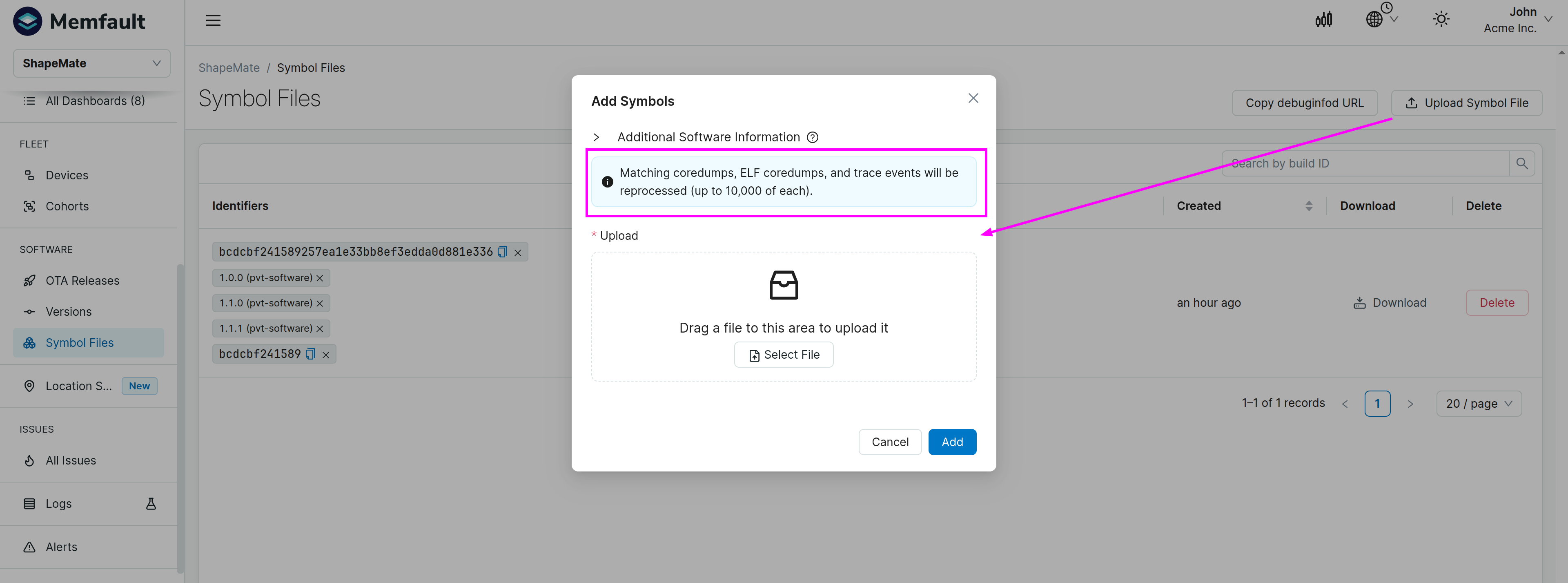
Symbol Files: reprocessing limit - The symbol file upload modal now displays a note that reprocessing is capped at 10,000 coredumps, 10,000 ELF coredumps, and 10,000 trace events per upload, so expectations are set before uploading symbols for a busy project.
-
Pro plan: 2 projects - Pro plan organizations can now create up to two projects (previously limited to one), unlocking multi-project workflows for teams that want to separate production and staging or manage multiple product lines.
-
API:
retry_afteron rate limit responses - Rate-limited API responses now include aretry_afterfield (in seconds) so clients can back off and retry at the right time without guessing. -
Charts: drill-down - Fixed drill-down navigation on reboot-by-population and metric aggregate charts.
-
Reboot alerts - Fixed an issue where reboot reason values weren't matched correctly in alert conditions.
-
Compact log decode - When a compact log entry's ID is missing from the ELF (for example, after a firmware update that changes log format IDs), the trace decoder now emits a placeholder with the raw CBOR data instead of failing with an error.
Device SDK Updates
MCU: [1.39.0] - 2026-05-06
See the full MCU SDK changelog.
- Added ThreadX per-thread stack usage capture in coredumps. Call
memfault_threadx_get_thread_regions()frommemfault_platform_coredump_get_regions()to record per-thread stack watermarks; results appear in the Trace Viewer alongside each thread's backtrace. See the reference sample for integration guidance. - Added ARM USE_SWITCH context switch support for Zephyr 4.4.0 and later
(where
USE_SWITCHis introduced), which provides an alternate context-switching mechanism for Cortex-M targets. - Added ESP32-S3 thread awareness in Zephyr - non-active Xtensa threads now decode correctly in coredumps.
- Added a non-TLS HTTP chunk upload option
(
CONFIG_MEMFAULT_HTTP_DISABLE_TLS) for local debugging with a proxy server. This option must not be enabled in production firmware. - Added build support for legacy ARM cores (ARMv4T, ARMv5TE, ARMv6); coredump capture and exception tracking are not supported on these architectures.
- Mbed OS port removed as previously announced in 1.38.0; cloud-side processing is unaffected.
CLI: [1.8.1] - 2026-05-13
See the full CLI changelog.
post-chunkanddeploy-releasecommands now print clickable links to the relevant pages in the web app after each successful operation, saving a trip to the browser to confirm the upload landed.